
Why the Azure hub-and-spoke model remains the “default” in the enterprise
Azure hub-and-spoke isn’t “just” a VNet scheme. It’s an operating model: centralizing shared services (security, connectivity, DNS, inspection) in a hub, and isolating workloads (applications, environments, business units) in spokes.
The goal: to reduce complexity, better control traffic flow, and make governance more predictable (and auditable).
But in practice, most incidents stem from details: a poorly designed DNS, a UDR route that breaks a connection, an overly permissive “temporary” NSG, or a firewall inspection that was never aligned with application requirements.
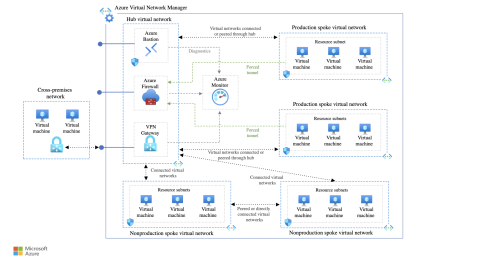
The "network" checklist before even drawing the diagram
Before creating VNets, clarify these points:
- Segmentation: Which spokes (production/non-production, by application, by business unit)?
- Connectivity: Direct outbound internet, via firewall, via NVA, via proxy?
- On-premises: VPN, ExpressRoute, both, and which failover model?
- DNS: Internal resolution, private zones, split-horizon, AD DS integration?
- Inspection: Which flows should be inspected (north-south, east-west)?
- Private vs. public: Generalized private endpoint or on a case-by-case basis?
- Observability: Network logs, flow logs, alerting, standardized diagnostics.
If these decisions are not made, the Azure hub-and-spoke becomes a tightly wired, unmanageable “spaghetti” network.
Design checklist: peering, routing, and transit
1. VNet Peering: simple… until transit
Peering is quick to set up, but you must decide explicitly:
- Allow forwarded traffic (if you have Firewall/NVA)
- Use remote gateways / Allow gateway transit (if the hub carries the gateway)
- Topology: single hub, regional hubs, or global hub + local hubs
Key point: peering is not transitive. You need to design the transit through hub (and associated routing), otherwise the spokes don’t “see” as expected.
2. Routing: UDR, BGP, and “who decides the path”
Routing is often the number one source of surprises.
- UDR (User Defined Routes): useful for forcing traffic through firewalls/NVAs
- BGP: useful with ExpressRoute/VPNs, but can introduce unexpected routes
- Priority: a UDR can overload system routes and break a flow that worked yesterday
Routing checklist:
- Define on-premises, spoke, and shared service prefixes
- Document routing tables per subnet (not just per VNet)
- Validate the internet exit path (SNAT, inspection, exceptions)
- Test critical flows: DNS, AD, updates, PaaS access, external APIs
Security checklist: NSG, Azure Firewall, and realistic micro-segmentation
NSG: the bare minimum (but not enough)
NSGs are ideal for L3/L4 segmentation close to workloads.
- Standardize patterns (spoke-app, spoke-data, management)
- Avoid “Any/Any” rules, even temporary ones
- Use Application Security Groups (ASGs) to reduce rule debt
Azure Firewall: The place where it all ends up
If you centralize inspection, you must treat Azure Firewall as an operational product:
- Policy-as-code (or at a minimum: versioning + change management)
Network vs. application rules (FQDN): clarify intent - DNAT: document entries (and justify them)
- Logs: enable and leverage them (don’t just “collect”)
Common pitfall: you enable the Firewall, then discover that PaaS flows (Storage, Key Vault, ACR) require a clear policy (Private Endpoint, service endpoints, or controlled exceptions).
DNS & Private Endpoints: Where architectures are won (or lost)
DNS is often underestimated, especially when Private Endpoints are widely adopted.
DNS Checklist:
- Choose the model: Azure DNS Private Resolver, DNS servers in the hub, AD DS, or hybrid
- Create the necessary Private DNS Zones (per service)
- Link the zones to the relevant VNets (hub + spokes)
- Manage split-horizon (same name, different internal/external resolution)
- Test resolution from each spoke (not just from the hub)
If you use Private Endpoints without consistent DNS, you will experience unusual symptoms: intermittent timeouts, access working from one spoke but not another, or applications falling back to public endpoints.
Observability: what you need to activate from day 1
- NSG Flow Logs (and an actionable retention strategy)
- Azure Firewall logs (Application + Network + Threat Intel if used)
- Connection Monitor for critical flows
- Standardized diagnostic settings (policy)
- A minimal dashboard: top denials, top flows, top destinations, anomalies
Without observability, you’re debugging randomly. With it, you reduce MTTR and secure changes.
The final test: 10 validations before saying “it’s ready”
- Internal DNS resolution OK (hub + each spoke)
- Expected PaaS access (public/private) validated
- Compliant internet outbound traffic (SNAT, inspection, exceptions)
- On-premises ↔ spoke traffic validated (VPN/ER)
- Spoke ↔ spoke traffic (if allowed) validated via hub
- NSG: no unjustified “open” rules
- Firewall: minimal rules, logging enabled, documented policy
- Monitoring: flow logs + basic alerting in place
- Documentation: diagram + routing + DNS + responsibilities
- Incident runbook: “where to look first” (DNS, routes, NSG, Firewall)
Training: AZ-700 (and reinforcement with AZ-104)
If you design, secure, or troubleshoot Azure networks, the Azure Network Engineer Associate (AZ-700) certification course is an excellent framework for structuring your skills in connectivity, security, DNS, hybrid networks, and troubleshooting.
If you want to strengthen your broader Azure administration skills (identity, compute, storage, governance), the Azure Administrator AZ-104 course is a great complement.
FAQ
Is Azure hub-and-spoke “mandatory” in business?
No, but it is often the most governable model at scale as soon as you need to standardize connectivity, inspection, DNS and segmentation across multiple environments/teams.
What is the #1 mistake in a hub-and-spoke design?
Do not decide (and test) the DNS + Private Endpoints model from the start: private zones, VNet links (hub + spokes), hybrid resolution, split-horizon.
Does VNet peering make the spokes transitive through the hub?
No. Peering is not transitive. Spoke↔spoke transit “via hub” must be explicitly designed (routing/UDR + security + possible inspection).
Forced tunneling ou split tunneling : lequel choisir ?
Forced tunneling = centralized control/inspection but complexity (UDR, SNAT, SaaS dependencies).
Split tunneling = simpler, but less centralized control. Choose according to your inspection and compliance requirements.
Why does “it sometimes work” but not the time-out app?
Often this is due to asymmetric routing (outgoing through Firewall/NVA, different return path) or inconsistent DNS between spokes. This is the classic source of “intermittent” outages.
NSG vs Azure Firewall: Are NSGs sufficient?
Often this is due to asymmetric routing (outgoing through Firewall/NVA, different return path) or inconsistent DNS between spokes. This is the classic source of “intermittent” outages.